Where to Get VR Sports Accessories

Looking for VR sports accessories that actually improve your game? You are not alone. Once you have a Meta Quest 3 or Quest 3S, the next step for many players is finding a cricket bat, tennis handle or golf club attachment that feels closer to the real thing.
where to get vr sports accessories

The best place to start is VR Merch Store. It specialises in practical sports attachments for Meta Quest headsets, including VR cricket bats, tennis attachments and golf clubs.

Why VR Sports Accessories Matter

Playing sports in VR with a standard controller works, but it never quite feels right. A proper attachment changes the weight, grip and swing. That makes cricket shots more natural, tennis swings more accurate and golf swings more consistent.

Good VR sports accessories also help with immersion. When your hands are holding something that resembles a real bat, racket or club, the game becomes more enjoyable and easier to play for longer sessions.

VR Cricket Bats

If you play iB Cricket, a dedicated bat is one of the most useful upgrades you can buy. VR Merch Store sells cricket bats designed for Meta Quest 3 and Quest 3S, plus a version for Quest 2.

The Meta Quest 3 and 3S VR Cricket Bat is the store’s flagship sports accessory. It is produced and shipped from the UK and is widely recommended by VR cricket players because it feels balanced and holds up well with regular use.

There is also a Quest 2 cricket bat if you have not upgraded your headset yet.

VR Tennis Attachments

Tennis in VR feels much better when you have a proper handle. A tennis attachment gives you a more realistic grip and swing path than holding a controller on its own.

You can find a Tennis Attachment for Meta Quest 3 and 3S at VR Merch Store. It is a simple, focused accessory designed to clip onto your controller and make racket sports feel more natural.

VR Golf Clubs

Golf games such as GOLF+ benefit from a club attachment because the extra length and weight help you judge your swing. A golf accessory will not turn VR golf into a full simulator, but it does make practice and casual rounds more satisfying.

VR Merch Store offers a VR Golf Attachment for Meta Quest 3 and 3S for players who want that extra bit of realism.

Where to Buy VR Sports Accessories

You can find generic attachments on large marketplaces, but quality varies a lot. Many cheap options feel flimsy, slip during play or do not fit Quest 3 and 3S controllers well.

VR Merch Store is a better option if you want accessories made specifically for Meta Quest sports games. The range is focused rather than huge, which is useful when you just want a cricket bat, tennis handle or golf club that works.

Browse the full accessories collection here:
https://vrmerchstore.com/collections/vr-accessories

What to Check Before You Buy

Before ordering any VR sports accessories, check these points:

  • Compatibility with Quest 3, Quest 3S or Quest 2
  • How the attachment connects to the controller
  • Delivery times, especially if the product ships from the UK
  • Possible import charges for international orders

UK customers should allow around 10–12 business days for some items. International delivery can take longer, and customs fees may apply.

Final Thoughts

If you want VR sports accessories that improve cricket, tennis or golf on Meta Quest, start with a specialist store rather than a random marketplace listing. VR Merch Store is one of the simplest places to find a cricket bat, tennis attachment and golf club designed for current Quest headsets.

Pick the accessory that matches the sport you play most, then get back in the game with a better swing.
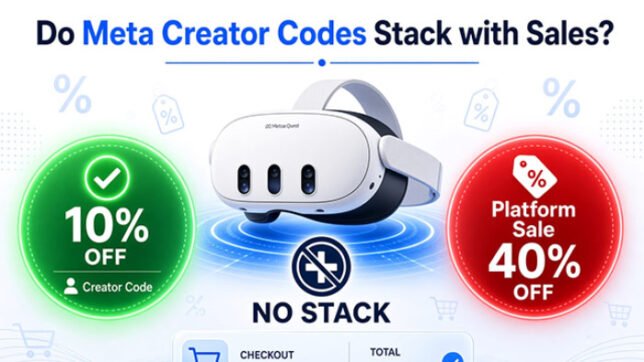
Do Meta Creator Codes Stack with Sales? What You Need to Know

You’re about to buy a game on the Meta Horizon Store. There’s a solid platform sale running, and you also have a creator code ready. Naturally, you wonder: can I combine both for an even bigger discount?

Do Meta Creator Codes Stack Up?

The short answer is almost always no. Meta creator codes (like VRCGUY) and limited-time platform sales do not stack. Understanding why — and how to still get the best possible price — will save you time, frustration, and money.

This guide explains exactly how Meta creator codes and sales work together (or rather, how they don’t), so you can make smarter buying decisions every time.

What Are Meta Creator Codes?

Meta creator codes are permanent discount codes given to official Meta Creator Affiliates. When you enter a code such as VRCGUY at checkout, you normally receive 10% off eligible full-priced games and apps in the Meta Horizon Store.

These codes work on:

  • Meta Quest headsets (Quest 3, Quest 3S, Quest 2, Quest Pro)
  • The Meta Horizon mobile app
  • meta.com

They are designed as a simple, ongoing way for creators to help their audience save money while supporting the creator.

What Are Platform-Wide Sales?

Platform sales are temporary promotions run by Meta itself. These often appear as:

  • 20–50% off selected titles
  • Store-wide percentage discounts
  • Seasonal events (Black Friday, summer sales, etc.)

During these periods, many games drop in price for a limited time. The discounted sale price becomes the new “current price” shown in the store.

Do Meta Creator Codes Stack with Sales?

No. Creator codes and Meta platform sales generally cannot be combined.

According to Meta’s official Creator Affiliates Program terms, the 10% creator discount “cannot be combined with other offers, discounts, bundles, or coupons.”

In practice, this means:

  • If a game is already on sale, the creator code will usually not apply (or will not give any additional reduction).
  • The system prioritizes the platform sale price.
  • You will only see the sale price at checkout — the creator code either gets rejected or has no effect.

This is the same rule that applies to most limited-time offers on the Meta Horizon Store.

Why Creator Codes and Sales Don’t Combine

Meta treats creator discounts and platform sales as separate promotional tools. The creator code is intended for full-priced items only. Once Meta has already reduced the price through a store-wide or curated sale, the system blocks further stacking to keep pricing consistent and prevent deeper-than-intended discounts.

This policy protects both Meta’s promotional budgets and the value of the creator affiliate program. It also keeps the checkout experience predictable for users.

How to Decide: Use the Code or Wait for a Sale?

Here’s a simple decision framework:

Use the creator code (VRCGUY) when:

  • The game is at full price
  • You want the game now and don’t want to wait
  • No significant sale is currently running
  • You plan to buy several full-priced titles at once (the code works multiple times)

Wait for (or use) a platform sale when:

  • The sale discount is larger than 10%
  • The specific game you want is included in the current promotion
  • You are not in a hurry

Quick tip: Always compare the final price after applying the code versus the current sale price. Sometimes a 30–40% platform sale is clearly better than a permanent 10% creator discount. Other times the opposite is true.

How to Check the Final Price Every Time

Never assume the discount has applied. Follow these steps:

  1. Add the game or app to your cart.
  2. Click “Add promo code” (or the equivalent option).
  3. Enter VRCGUY and apply.
  4. Look carefully at the final total before confirming payment.
  5. If the price has not dropped by 10%, the item is likely on sale or otherwise ineligible.

You can do this on your headset, in the Meta Horizon app, or on meta.com. The process is the same across all three.

Extra Tips to Maximize Your Savings

  • Keep an eye on the current platform-wide sales section on this site. We update it whenever Meta runs a major promotion.
  • Check the A-Z directory for individual games. Many pages note whether the VRCGUY code is currently working on that title.
  • Buy full-priced games in batches when no big sale is happening. The 10% adds up quickly.
  • Remember that creator codes usually do not work on items already discounted, bundles, or certain special offers.
  • Always verify the final price yourself — terms can occasionally change, and eligibility can vary by region or account.

Final Thoughts

Meta creator codes and platform sales are both excellent ways to save money, but they almost never work together. Knowing this simple rule removes the guesswork and helps you choose the better deal every time.

When a game is full price, enter VRCGUY at checkout for an instant 10% discount. When a strong platform sale is running, take advantage of that instead. Either way, you’ll stretch your VR budget further.

Ready to save on your next purchase? Browse the full A-Z directory of Meta Horizon titles or head straight to the Meta Horizon Store and try the code yourself.

How to Use the VRCGUY Promo Code on Meta Quest (Complete Step-by-Step Guide)

Saving money on Meta Quest games and apps is easier than you think. The official Meta Creator Affiliate code VRCGUY gives you a permanent 10% discount on full-priced titles in the Meta Horizon Store. It works on Meta Quest 3, Quest 3S, Quest 2, and Quest Pro, and you can use it as many times as you like on eligible purchases.

How to use the VRCGUY Promo Code

In this complete guide, you’ll learn exactly how to apply the VRCGUY promo code on your headset, in the Meta Horizon mobile app, or on meta.com. You’ll also discover important rules, troubleshooting tips, and best practices so you never miss out on savings.

What Is the VRCGUY Promo Code?

VRCGUY is an official Meta Creator Affiliate promo code. When you apply it at checkout on the Meta Horizon Store, you receive an instant 10% discount on full-priced games and apps.

Key benefits include:

  • Permanent 10% off eligible full-priced titles
  • Works across all current Meta Quest headsets
  • Unlimited use on qualifying purchases
  • Simple application process with no complicated redemption steps

The code is regularly checked and updated on this site to ensure it continues delivering savings.

Important Things to Know Before You Apply the Code

Before you start, keep these rules in mind so you avoid frustration at checkout:

  • Full-priced items only: The code works on games and apps that are not already discounted. It does not apply to sale items or items already on promotion.
  • No stacking with platform sales: Creator codes like VRCGUY usually cannot be combined with Meta’s limited-time store-wide sales or other promo codes. Always check the final price before paying.
  • Unlimited use: You can enter VRCGUY on as many eligible full-priced titles as you want.
  • Always verify: Terms can change. Confirm the discount appears in your cart total before completing the purchase.

These guidelines help you get consistent savings without surprises.

How to Use the VRCGUY Promo Code: Three Easy Methods

You can apply the code in three places. Choose the method that is most convenient for you.

Method 1: On Your Meta Quest Headset

This is the most direct way if you are already wearing your headset.

  1. Put on your Meta Quest headset and open the Meta Horizon Store.
  2. Browse or search for the full-priced game or app you want.
  3. Select the title and add it to your cart.
  4. Go to checkout.
  5. Look for the “Add promo code” option (usually near the order summary).
  6. Enter VRCGUY exactly as written (all capital letters).
  7. Apply the code. You should see the 10% discount appear immediately.
  8. Complete your purchase and enjoy the savings.

The discounted game will appear in your library ready to download.

Method 2: Using the Meta Horizon Mobile App

Many people prefer this method because the phone screen is easier for typing.

  1. Open the Meta Horizon app on your smartphone and make sure you are logged into the correct Meta account linked to your headset.
  2. Navigate to the Meta Horizon Store section or search for the game/app.
  3. Add the full-priced title to your cart.
  4. Proceed to checkout.
  5. Tap “Add promo code” or the equivalent field.
  6. Type VRCGUY and apply it.
  7. Confirm the discounted total and finish the purchase.

Once complete, the game becomes available in your headset library.

Method 3: On meta.com (Web Browser)

This works well if you are shopping from a computer.

  1. Go to meta.com and sign in to your Meta account.
  2. Search for the full-priced game or app in the Meta Horizon Store.
  3. Add it to your cart.
  4. Proceed to checkout.
  5. Find the “Add promo code” field in the order summary.
  6. Enter VRCGUY and click Apply.
  7. Verify the 10% discount shows in the total, then complete payment.

The purchase will sync to your Meta Quest library automatically.

What If the VRCGUY Code Does Not Apply?

Occasionally the code may not work. Here are the most common reasons and quick fixes:

  • The item is already on sale or discounted → The code only works on full-priced titles.
  • You mistyped the code → Re-enter VRCGUY in all capital letters with no spaces.
  • You are trying to stack it with another promotion → Remove other codes or wait until the platform sale ends.
  • Temporary system issue → Refresh the page, clear your cart, or try a different device (headset vs app vs web).
  • Regional or account restrictions → Confirm you are using the account linked to your headset and that the title is available in your region.

If the discount still does not appear after checking these points, try removing the item from your cart and adding it again, or switch to a different method (for example, from headset to the mobile app).

Tips to Get the Maximum Value from VRCGUY

  • Check the price first. Confirm the title is listed at its regular full price before applying the code.
  • Buy multiple eligible titles in one session if you plan ahead—you can apply the code to each one.
  • Use the code whenever you find a full-priced game you want. There is no limit on how many times you can use it.
  • Bookmark this page or the A-Z directory so you can quickly verify eligibility for any title.
  • Combine smart shopping habits: watch for full-price releases or titles that come off sale, then apply VRCGUY for consistent 10% savings.

Frequently Asked Questions

Does VRCGUY work on Quest 3, Quest 3S, Quest 2, and Quest Pro?
Yes. The code works on all current Meta Quest headsets.

Can I use the code more than once?
Yes. You can use VRCGUY as many times as you like on eligible full-priced games and apps.

Will the code work with Meta’s big store-wide sales?
Usually no. Creator codes typically do not stack with limited-time platform promotions. Always check the final price.

Is VRCGUY an official code?
Yes. It is an official Meta Creator Affiliate code.

What happens after I apply the code?
You receive an instant 10% discount at checkout. The game or app is added to your library at the reduced price.

Start Saving on Meta Quest Games Today

Using the VRCGUY promo code is one of the simplest ways to stretch your VR budget further. Whether you prefer applying it on your headset, in the mobile app, or on the web, the process takes less than a minute and delivers reliable 10% savings on full-priced titles.

Ready to try it? Open the Meta Horizon Store, add a full-priced game to your cart, enter VRCGUY, and watch the price drop.

For a complete list of titles where the code is ready to use, visit the full A-Z directory on this site. Happy gaming—and happy saving!

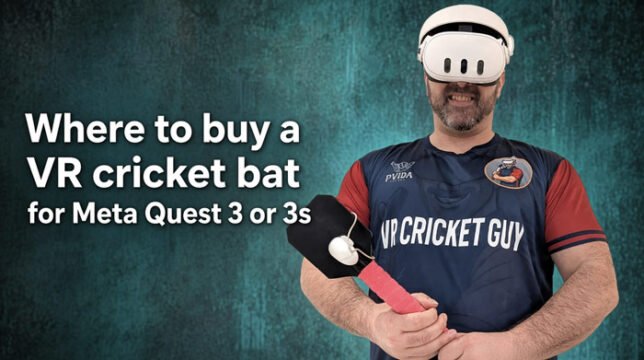
Where to Buy a Cricket Bat for Meta Quest 3 or 3S?

Looking for a proper cricket bat attachment for your Meta Quest 3 or Meta Quest 3S? The best place to buy one is VR Merch Store.

Where to buy a VR cricket bat for a Meta Quest 3 or 3s?

Their Meta Quest 3 and 3S VR Cricket Bat is the only VR cricket bat recommended by VR Cricket Guy — the well-known creator who specialises in iB Cricket and Meta Quest cricket content. He has tested multiple bats over several years and consistently calls this one the clear winner for reliability, tracking, and feel.

Buy it here: VR Merch Store – Meta Quest 3 and 3S VR Cricket Bat

Why VR Merch Store Is the Top Choice

Most generic controller grips or cheap 3D-printed bats cause tracking issues, feel light and toy-like, or come loose during aggressive shots. The VR Merch Store bat solves these problems.

Key reasons it stands out:

  • Official recommendation from VR Cricket Guy — He states it is the only bat he recommends. He has used it for over a year with no tracking glitches, even on the highest difficulty settings in iB Cricket.
  • Designed specifically for Meta Quest 3 and 3S — It works with the Touch Plus controllers and maintains clean tracking.
  • Perfect for iB Cricket — The game that most serious VR cricket players use. The bat delivers a natural two-handed grip and realistic swing weight.
  • Produced and shipped from the UK — Solid build quality.
  • Simple setup — Quick-release system so you can attach or remove the controller easily.

There is also a lighter “LITE” version available on the same site if you prefer reduced weight for longer sessions or younger players.

What Makes a Good VR Cricket Bat?

A proper VR cricket bat needs three things:

  1. Secure attachment so the controller does not shift mid-shot.
  2. Good weight distribution that feels closer to a real bat without causing arm fatigue.
  3. Clear line-of-sight for the Quest’s cameras so tracking stays accurate during fast drives and pulls.

Cheap alternatives often fail on one or more of these points. That is why VR Cricket Guy keeps directing people to the VR Merch Store version.

Current Price and Shipping Notes

The main Meta Quest 3 / 3S VR Cricket Bat is priced at $75 USD (check the site for the latest figure).

Shipping originates from the UK. UK customers can expect delivery in roughly 10–12 business days. International orders take longer, and you may have to pay import taxes or customs fees depending on your country. Always check your local customs rules before ordering.

How to Buy

  1. Visit the official product page: https://vrmerchstore.com/products/meta-quest-3-and-3s-vr-cricket-bat
  2. Choose the standard or LITE version if available.
  3. Add to cart and complete checkout.
  4. Once it arrives, attach your right-hand Quest controller and jump into iB Cricket.

Frequently Asked Questions

Is this the only bat VR Cricket Guy recommends?
Yes. He has repeatedly said it is the only one he recommends after testing several options over multiple years.

Does it work with both Quest 3 and Quest 3S?
Yes. It is designed for both models.

Will it work with other VR cricket games?
It is optimised for iB Cricket but can be used with other titles that support controller-based batting.

Is there a discount code?
Check the product page or VR Cricket Guy’s channels for any current promo codes (he has shared codes such as “youtubevideo” in the past).

Ready to Step Up to the Crease?

If you want the most reliable and highly recommended VR cricket bat for Meta Quest 3 or 3S, buy directly from VR Merch Store. It is the only bat endorsed by VR Cricket Guy and the one that consistently delivers smooth tracking and an authentic feel in iB Cricket.

Get yours now: VR Merch Store – Meta Quest 3 and 3S VR Cricket Bat

Enjoy the game — and may your cover drives find the boundary.

Where is the Best Place to Buy a Meta Quest 3 or 3S?

Looking for the best place to buy a Meta Quest 3 or Meta Quest 3S? The official Meta Store—accessed through trusted creator affiliate links—is the smartest choice for most buyers.

Where to buy a Meta Quest 3 or 3s?


You’ll get a genuine headset, free shipping, a straightforward 30-day return window, direct manufacturer support, and often a 3-month trial of Meta Horizon+. Using the right links also supports creators while ensuring you land on the official product pages.

Recommended links

Why the Official Meta Store Is the Best Place to Buy

Buying directly from Meta (via the affiliate links above) offers several clear advantages over third-party retailers:

  • Authenticity and warranty — You receive a brand-new unit with full manufacturer support. Warranty claims and replacements are handled by Meta itself.
  • Free delivery and easy returns — Most orders ship free, and you typically have 30 days to return if the headset isn’t right for you.
  • Extras included — New purchases usually unlock a 3-month Meta Horizon+ trial (access to a rotating catalog of games and apps). Financing options (such as 0% APR plans) are often available.
  • No middleman issues — Avoid third-party sellers, potential stock shortages, or refurbished units sold as new.
  • Future-proof support — Software updates, account linking, and accessory compatibility are seamless when the device is registered through official channels.

Other retailers like Amazon, Best Buy, Target, Walmart, and GameStop frequently stock the headsets and sometimes match pricing or add gift cards or trade-in credits. However, support and returns can be more complicated if something goes wrong, and you may miss out on Meta-exclusive promotions.

Meta Quest 3 vs Meta Quest 3S: Which Should You Choose?

Both headsets run the same powerful Snapdragon XR2 Gen 2 chipset and deliver excellent standalone VR and mixed-reality experiences. The differences come down to display quality, design, and storage.

FeatureMeta Quest 3Meta Quest 3S
Display4K+ Infinite Display (higher resolution, sharper)High-definition (1832 × 1920 per eye)
DesignPremium slim comfortLightweight comfort
Storage optionsPrimarily 512GB128GB or 256GB
Best forHighest visual quality and long-term useBest value / entry-level VR
Typical starting price$599.99$349.99 (128GB) / $449.99 (256GB)

Choose the Quest 3 if you want the sharpest image and the most premium experience. Choose the Quest 3S if you want excellent performance at a lower price and plan to keep fewer large games installed.

Current Pricing and What’s Included (as of mid-2026)

Prices rose in April 2026 due to higher component costs (especially memory). Approximate U.S. pricing at the official store:

  • Meta Quest 3S 128GB — $349.99
  • Meta Quest 3S 256GB — $449.99
  • Meta Quest 3 512GB — $599.99

What’s in the box: the headset, two Touch Plus controllers, charging cable, and power adapter. Most new purchases also include the 3-month Horizon+ trial. Always check the product page for the latest bundles or regional pricing.

Other Places to Buy (and Their Trade-Offs)

  • Amazon — Fast shipping for Prime members, frequent stock, occasional gift-card or Game Pass promotions. Support is solid, but warranty claims still go through Meta.
  • Best Buy — In-store pickup and Geek Squad protection plans. Trade-in options can lower the price.
  • Target / Walmart / GameStop — Convenient for same-day pickup or Circle/Pro discounts. Inventory can fluctuate.

These are perfectly fine options if the official store is out of stock or a specific retailer offers a better temporary deal. Still, for peace of mind and the cleanest ownership experience, start with the official Meta Store links.

  1. Click the appropriate link for the model you want:
  1. Select your preferred storage option and any accessories.
  2. Complete checkout on the official Meta site.
  3. Activate the headset after it arrives to unlock any included Horizon+ trial or promotional Quest Cash (terms apply).

The links use Meta’s official creator affiliate program, so your purchase supports content creators while directing you to genuine product pages.

Frequently Asked Questions

Do I need a Facebook account?
No. You can create a Meta account with an email address.

Are refurbished units a good idea?
Meta’s own refurbished program can save money and still includes a warranty. Third-party “renewed” listings vary in quality—stick to Meta or major retailers if you go this route.

Can I return the headset?
Yes. The official store generally offers a 30-day return window. Check the exact policy at checkout.

Will prices drop again?
Major holidays (Black Friday, Prime Day, etc.) and new model launches often bring temporary discounts or bundles. The affiliate links will always point to the current official offers.

Ready to Dive Into VR?

The best place to buy a Meta Quest 3 or 3S is the official Meta Store through these creator affiliate links. You get a genuine product, reliable support, free shipping, and the full manufacturer experience—without the guesswork of third-party sellers.

Prices and promotions can change, so click through to see the latest availability and any limited-time extras. Enjoy the immersive world waiting for you.

Why Does TikTok Restrict My VR Live Gaming Stream?

TikTok Live is a powerful platform for VR gamers who want to share immersive experiences in real time. Yet many creators face the same frustrating message: their stream has been restricted for “unoriginal or pre-recorded content.”

TikTok restricts TikTok live stream


This restriction is common among VR streamers even when everything is genuinely live. Understanding why it happens — and how to reduce the flags — can make a big difference to your reach and monetisation.

Why TikTok Flags VR Streams as Unoriginal or Pre-Recorded

TikTok’s Community Guidelines and LIVE policies require streams to be real-time, original, and interactive. The platform actively detects content that looks like screen recordings, casts from other devices, or pre-produced material.

USE PROMO CODE VRCGUY for VR game downloads.

Official guidance specifically advises against:

  • Screen capturing
  • TV casting or similar behaviours
  • Playing content from electronic device screens

When you stream VR gameplay from a headset such as the Meta Quest, the system often interprets the game feed as reproduced content. The game assets themselves were created by someone else, and the casting process can introduce compression, latency, or visual patterns that automated detection systems associate with recordings.

A pure 50/50 split-screen layout (webcam on one half, full game cast on the other) frequently triggers these systems because the game portion dominates and the human presence can appear limited, especially when a headset partially obscures the face.

Common Triggers in VR Live Setups

Several factors unique to VR streaming increase the chance of a restriction:

  • Casting the headset display – Casting the Quest view to a browser or app and then capturing it is treated as screen recording of an electronic device.
  • Game footage dominance – Large areas of pre-rendered game content are flagged as unoriginal.
  • Limited visible human activity – Wearing a headset reduces facial expressions. If the webcam shows mostly a static or partially obscured face, the stream can look low-interaction.
  • Layout choices – Clean horizontal splits or layouts where the game takes most of the screen raise the risk.
  • Technical artefacts – Slight stuttering, lower frame rates, or compression from wireless casting can make the feed appear less “live.”

These issues affect many legitimate gaming creators, not just VR streamers. The detection is largely automated and imperfect, which is why appeals often fail even when the stream is fully live.

Practical Ways to Reduce Restrictions

You can significantly lower the chance of flags by adjusting your layout, capture method, and streaming behaviour while still giving viewers a clear view of both your real-world movement and the VR gameplay.

1. Prioritise Clear Human Presence in the Layout

TikTok rewards visible, continuous real-time human activity. For VR gaming this means showing enough of your body and movement so viewers (and the algorithm) can see you are actively playing.

Recommended vertical layout:

  • Top 40–50% – Webcam framed wider to show upper body, arms, and movement (face still visible).
  • Bottom 50–60% – Cropped game cast.

This keeps a strong live-human signal while giving the game plenty of space. Avoid pure 50/50 splits and very small webcam windows.

Create two scenes in TikTok Live Studio:

  • Just Chatting – Webcam only, large and well-lit.
  • Gaming – The body + game layout above.

2. Improve How You Capture the Headset Feed

Cast to a browser window on your PC, then use Window Capture of that specific window inside TikTok Live Studio. Crop tightly so no browser chrome or Meta UI remains. Window Capture is generally cleaner than full Display Capture for detection systems.

If you use Meta Quest Link, the cast can appear as a video capture device, which often looks more stable.

3. Change Your Go-Live Sequence

Start the stream on the Just Chatting scene. Talk, greet viewers, and build interaction for the first 10–15 minutes. Only then switch to the Gaming scene. This helps the system register the stream as live and interactive before the game feed appears.

4. Maintain High Verbal Interaction

Talk throughout the stream. Describe what you are doing, react out loud, and respond to comments. Sustained real-time speech is one of the strongest signals against the pre-recorded flag.

5. Technical Best Practices

  • Use a stable high-bandwidth connection (preferably 5 GHz Wi-Fi or Ethernet).
  • Ensure good lighting on your body so movement is clear.
  • Use the official Pause feature if you need to step away — never leave a static screen.
  • Avoid watermarks or third-party logos on the game feed.

Final Thoughts

TikTok’s restrictions on VR Live Gaming streams are usually the result of automated systems reacting to casting methods, game-heavy layouts, and limited visible human activity rather than deliberate policy violations. By increasing the size and clarity of your real-world presence, using cleaner capture methods, starting with interaction-focused scenes, and maintaining strong verbal engagement, many creators see a clear reduction in flags.

Experiment with the body-focused layout and the two-scene approach on your next few streams. Track whether the restrictions decrease. Small, consistent changes often produce the best results over time.

If you continue to experience issues after making these adjustments, document your setup and appeal with evidence that the content is live. Persistence and careful optimisation remain the most reliable path forward for VR creators on TikTok Live.

Playing VR Table Tennis on the Hottest Day of the Year (in My Back Garden)

I’ve just uploaded a new YouTube Short and I thought I’d write a quick blog post about it here on vrcguy.com.

The short is called “Playing VR Table Tennis on the Hottest Day of the Year in my Back Garden” and you can watch it right here:

What I was doing

It was one of those stupidly hot British summer days (you know the ones where even the grass looks like it’s given up). Instead of melting on the sofa, I grabbed the Meta Quest 3, stepped out into the back garden, switched on mixed reality, and started playing Eleven Table Tennis.

I’ve been giving this game a proper good go lately and the physics are just unreal. Proper realistic. You genuinely forget you’re in VR half the time. The ball behaves exactly how it should — spin, bounce, the lot. You can practise against the AI (and that AI is no joke) or jump online and play ranked matches against people from all over the world. It’s properly addictive.

Eleven Table Tennis video

And yes… I still get proper sweaty. Same as when I’m grinding out overs in iB Cricket. The difference is I’m standing in my own garden instead of the kitchen or the living room.

Why mixed reality makes it even better

Playing table tennis in mixed reality outdoors on a sunny day is something special. You can see the real garden, the real sky, the real fence… and the virtual table and ball are right there in front of you. It feels less like a “VR game” and more like you’ve just set up a proper table tennis table in the garden (without the hassle of actually owning one).

It’s also a fantastic little workout. You’re moving, reacting, stretching… all while the sun is beating down. Perfect if you want something different from cricket every now and then.

Get the game yourself

If you fancy having a bash at Eleven Table Tennis, download it from the Meta Store and use the promo code VRCGUY.

It’s one of my favourite non-cricket VR sports games right now, and I can see myself coming back to it regularly — especially on days like this when the weather is too good (or too hot) to stay indoors.

Have you tried Eleven Table Tennis yet? Drop a comment below or over on the Short — I’d love to hear what you think.

What to Choose: Meta Quest 3 or Meta Quest 3S?

Choosing between the Meta Quest 3 and Meta Quest 3S is one of the most common questions for anyone looking to buy a new VR headset in 2026. Both headsets are excellent, share the same powerful processor, and can play the exact same games. The decision mainly comes down to how much you value image quality and mixed reality versus saving money.

Meta Quest 3 or 3s

Here’s a clear breakdown to help you decide.

Quick Specs Comparison (2026)

FeatureMeta Quest 3Meta Quest 3S
Price (approx.)$599–$600 (512GB)$349–$350 (128GB) / $449–$450 (256GB)
ProcessorSnapdragon XR2 Gen 2Snapdragon XR2 Gen 2 (identical)
RAM8GB8GB (identical)
Resolution (per eye)2064 × 22081832 × 1920
LensesPancakeFresnel
Field of ViewWider (~110° horizontal)Narrower (~96° horizontal)
Mixed RealityHigher quality + depth sensorFull-colour but lower resolution
Battery Life~2.2 hours~2.5 hours
Storage512GB only128GB or 256GB
Game LibraryFull Quest libraryFull Quest library (identical)

What They Have in Common

This is the most important point:
Performance is identical. Both headsets use the same Snapdragon XR2 Gen 2 chip and 8GB of RAM. Games run at the same frame rates and look equally smooth. There are no exclusive titles. Controllers, hand tracking, and the overall software experience are also the same.

If your main goal is simply to play the best VR games available (Beat Saber, Asgard’s Wrath 2, Ghosts of Tabor, etc.), either headset will deliver the full experience.

Where the Quest 3 Wins

The Meta Quest 3 is clearly the better headset in terms of visual quality:

  • Pancake lenses deliver much sharper image quality with better edge-to-edge clarity and far fewer “god rays” (those distracting light streaks common with Fresnel lenses).
  • Higher resolution makes text easier to read and environments look crisper.
  • Wider field of view creates a more immersive experience.
  • Superior mixed reality (passthrough) with a dedicated depth sensor — digital objects sit more naturally in your real room.
  • Slimmer design, which many people find more comfortable during longer sessions.

These improvements make a noticeable difference if you play a lot of VR, use mixed reality apps, or care about visual fidelity.

Where the Quest 3S Wins

The Meta Quest 3S is the smarter choice for many people because of its price:

  • You save roughly $200–$250 compared to the Quest 3.
  • It still offers full-colour mixed reality and the same powerful chip.
  • Slightly longer battery life in real-world use.
  • Excellent value if you’re new to VR or not sure how much you’ll use it.

The Fresnel lenses and lower resolution are noticeable when you compare the two side-by-side, but many first-time users find the 3S more than good enough.

Which One Should You Buy?

Choose the Meta Quest 3S if:

  • You’re buying your first VR headset
  • Budget is a priority
  • You’ll mostly play games rather than use mixed reality heavily
  • You want the best possible value

Choose the Meta Quest 3 if:

  • You want the best image quality available on a standalone headset
  • You plan to use mixed reality regularly (work, fitness, or immersive apps)
  • You play VR for longer sessions and value comfort + clarity
  • You prefer more storage (512GB) out of the box

Final Recommendation

For most people in 2026, the Meta Quest 3S is the better buy. It gives you nearly the same performance and the full game library at a significantly lower price. The visual upgrade on the Quest 3 is real and noticeable, but it’s not essential for enjoying modern VR.

If money isn’t a major concern and you want the highest quality experience Meta currently offers in a standalone headset, go for the Quest 3.

Both are excellent choices — you really can’t go wrong with either one.