Looking for a working Virtual Desktop Promo Code? You’re in the right place. Whether you want to stream PC VR games wirelessly, turn your Quest into a giant virtual monitor for work or movies, or simply access your full PC desktop inside VR, this page shows you how to save on one of the most essential apps for Meta Quest.
USE THE PROMO CODE : VRCGUY for your discount
Use this Direct link to Virtual Desktop with the discount already applied.
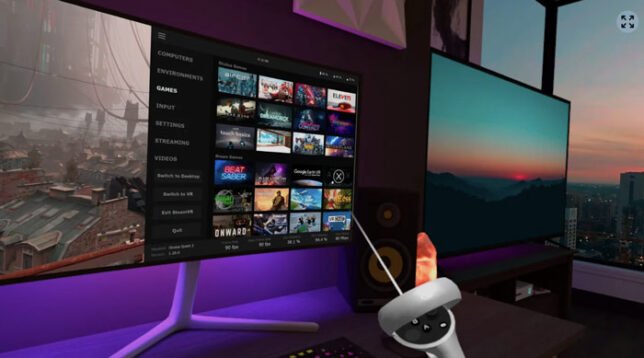
Virtual Desktop is a highly optimized native application developed by Virtual Desktop, Inc. It lets you wirelessly connect your Meta Quest headset to your Windows or Mac computer for low-latency, high-quality streaming. Available on Meta Quest 1, 2, 3, 3S, and Pro, it is one of the most popular and highly recommended utility apps in the Quest ecosystem.
Why Players Search for a Virtual Desktop Promo Code
Many Quest owners look for a Virtual Desktop Promo Code because the app unlocks two major capabilities: wireless PC VR gaming and a powerful virtual desktop experience. With a VR-ready Windows PC, you can stream SteamVR and other PC VR titles to your Quest without a cable. The streaming is known for excellent image quality and low latency when set up correctly on a strong 5 GHz or Wi-Fi 6 network.
Even without a VR-ready PC, Virtual Desktop lets you place large virtual monitors in your VR or Mixed Reality space. Watch movies, browse the web, work with multiple screens, or use productivity apps on a giant display that feels far more immersive than a physical monitor. Multi-monitor support, Bluetooth keyboard/mouse compatibility, and remote connection options add further flexibility.
You can browse many more Meta Quest titles that work with the VRCGUY code in our Ultimate A-Z of Meta Horizon Games with Promo Codes.
Features That Make It Essential
Virtual Desktop stands out for its focus on performance and usability. It is designed specifically for low latency and high visual quality. The Videos tab allows streaming or downloading regular, 180°, and 360° video content from your computer. Microphone passthrough, 3D side-by-side support, and continuous updates (including multi-monitor improvements) keep the app relevant years after its initial release.
For the best results, connect your PC to the router via Ethernet and use a dedicated 5 GHz or Wi-Fi 6 network. When set up properly, many users prefer Virtual Desktop over official Air Link for wireless PCVR streaming.
How to Use Your Virtual Desktop Promo Code
- Click the direct affiliate link above or search for Virtual Desktop on the Meta Horizon Store.
- Add the app to your cart.
- Enter the code VRCGUY at checkout.
- Complete the purchase, install the free Streamer app on your PC, and connect.
USE THE PROMO CODE : VRCGUY for your discount
Searching for “Virtual Desktop Promo Code” is common because the app is a must-have for anyone who wants wireless PC VR or a serious virtual workspace. Using the code with the direct link is the easiest way to get a discount on this essential tool. For a full list of other titles that accept the same code, visit the Ultimate A-Z of Meta Horizon Games with Promo Codes.
Whether you want cable-free PC VR gaming, a massive virtual cinema, or a productive multi-monitor setup in VR, Virtual Desktop remains one of the most valuable apps on Meta Quest. Grab it while the discount is available.
Use this Direct link to Virtual Desktop with the discount already applied.
The promo code will not work on games already discounted.